

+14155550177, and an invoice total as 1315.50 USD flagged as a charge.
Each starts as a span copied unchanged from the document. TypeSafe only chooses among
spans a regex already found, so it cannot invent a value or transpose a digit. You can
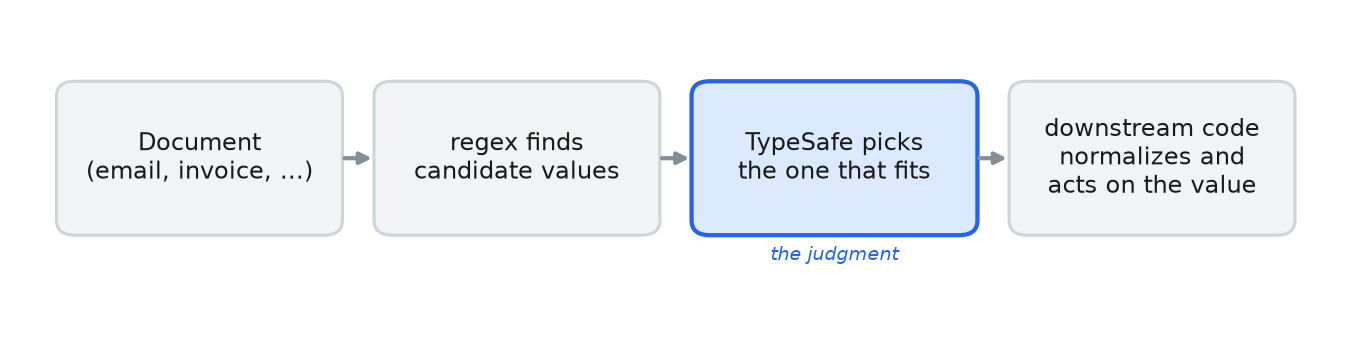
point the same find and pick pair at your own documents. There are three steps:
- A regex finds the candidate values in the text. Tune it to catch every real value, even if it also catches some wrong ones.
- TypeSafe picks which candidate the question is asking for, and reads off any attribute we need downstream (currency, country, whether an amount is a credit or a charge).
- We copy the picked value and normalize it.
Setup
TYPESAFE_API_KEY. To replay the published numbers without an API key, download
json_cache.json from typesafe-public-examples into the folder you run
the script from.
Helpers
We find candidates with a regex that catches every real value, and drop duplicate matches (find). We pick one with a Choice question whose options are those spans
(pick), so the answer is one of them copied exactly, or none when no candidate fits.
The currency and the country come from a Choice question over a fixed set of labels
(classify), and whether an amount is a credit from a Noul question (is_true).
Every call is cached to json_cache.json, so re-rendering makes no API calls.
Email: pick the right address by role
The headers hold four addresses. The body asks for the receipt to go to a personal address instead of theTo: billing alias, so the answer depends on reading the body.
We ask two questions: which address gets the receipt, and which one sent the message.
Reply-To: line, as the body asks. The
sender is the address on the From line. Both are copies of regex matches, which we
lowercase.
Phone: pick the mobile, normalize to E.164
The text has three numbers, and none of them carries a country code. TypeSafe picks the mobile and reads the country from the text;phonenumbers combines those two answers
into E.164, the international format that starts with a + and the country code.
phonenumbers formats the picked
number as +14155550177.
Money: pick the amount, classify the currency, flag credit vs charge
The invoice has four amounts on it. TypeSafe picks the total due and the credit, reads the currency, and flags each picked amount as a charge or a credit. We copy each picked string and parse it into aDecimal.
Noul question gives 0.03 for the total and 0.98 for the credit, so we know the sign of
each Decimal we parse.
We parse amounts on the assumption that the comma groups thousands and the dot is the decimal point. That holds for$1,315.50; in€1.315,50it is the other way round. Ask aNoulquestion such as “Does this document use a comma as the decimal point?” and branch on the answer.
Open it in the TypeSafe playground
To try the receipt question yourself, open the email thread in the playground. The four addresses the regex found are the question’s options.Two limits
- A
Choicequestion allows at most 255 options. With more candidates than that, narrow in two stages: pick the section first, then the span inside it. Line-by-line search shows the first stage: tag each line with an ID and let aChoicepoint to the lines that match. - Finding the candidates is the part that takes work. Emails, phone numbers and amounts have regexes that cover them; a name does not, so its candidates have to come from a roster you already have, or from a named-entity recognizer or an LLM that proposes them. TypeSafe then picks the one the question asks for.